
Best Server Rack with Cooling 2026: Fans and Ventilation to Keep Gear From Overheating
When you buy through the Amazon links on this page, we may earn a commission at no extra cost to you. Learn more
Last updated October 31, 2026
The best server rack with cooling for most small installs is the Tecmojo 6U wall mount cabinet when the load is light and shallow, and the Sysracks SRF 42.6.8 server rack once the cabinet holds servers and a UPS, because its four roof fans run off an air controller that switches on as temperatures climb. A rack's fans only matter against the heat going in, so add up the watts first.
The best server racks with cooling in 2026

Tecmojo 6U wall mount cabinet
See on Amazon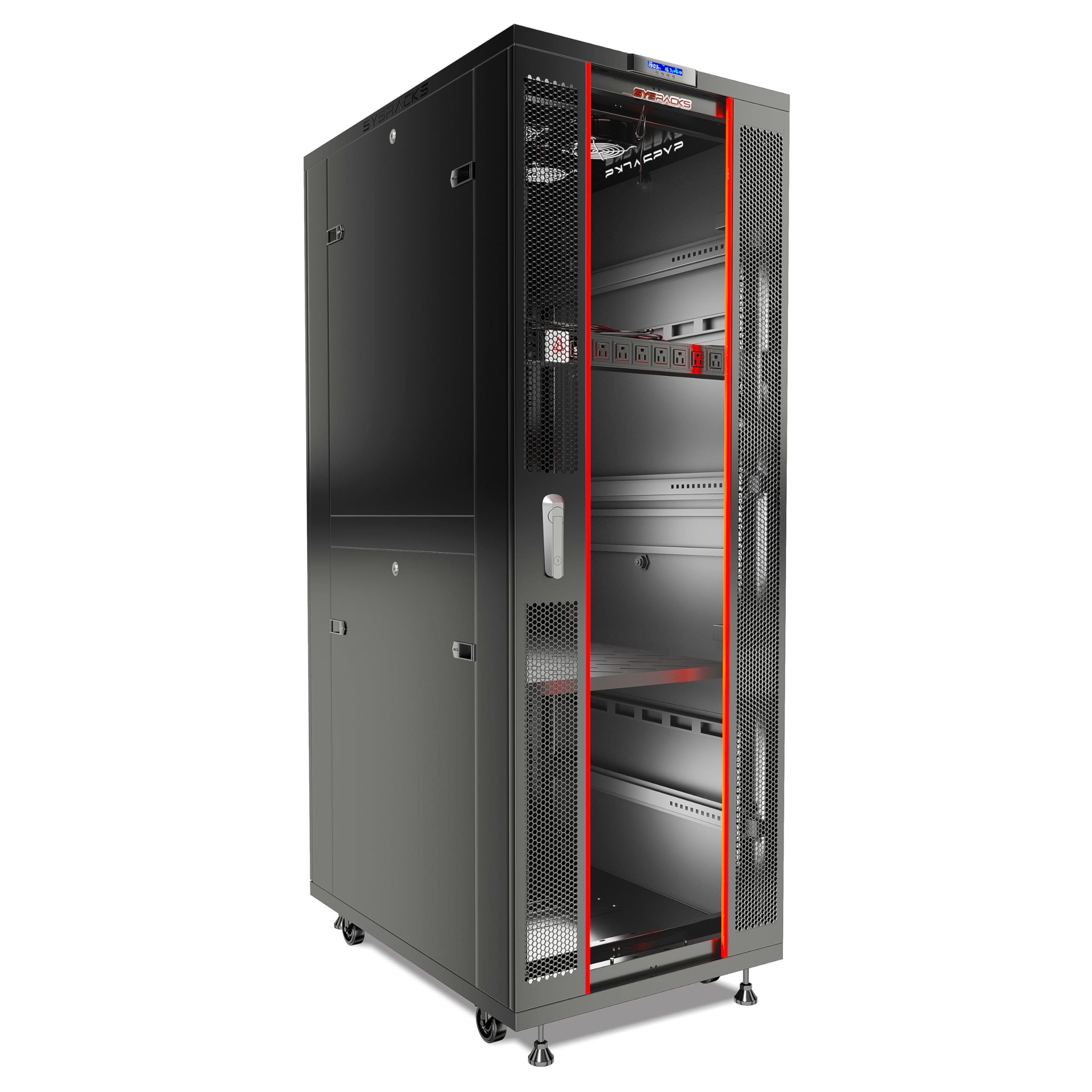
Sysracks SRF 42.6.8 server rack
See on Amazon
RackPath 9U wall mount cabinet
See on AmazonModel comparison
| Model | Price | Rating | Rack size | Mounting type | Weight | Best for | |
|---|---|---|---|---|---|---|---|
| | Tecmojo 6U wall mount cabinet | $109.90 as of 10/31 See on Amazon | ★ 4.6 (400+ ratings) | 6U | Wall mount | 28.6 lb | Shared-office buyers who need lockable access and whose deepest device stays under 14.2 in should choose this cabinet. |
| | Sysracks SRF 42.6.8 server rack | $1,267.00 as of 10/31 See on Amazon | ★ 4.8 (60+ ratings) | not stated | not stated | 230 lb | Buyers wanting an enclosed, actively cooled, powered cabinet from a single order who can take delivery of an 84-inch, 230 lb unit. |
| | RackPath 9U wall mount cabinet | $151.98 as of 10/31 See on Amazon | ★ 4.4 (250+ ratings) | 9U | Wall mount | not stated | Small office or classroom installers who want a presentable, lockable cabinet for switches, NVRs or shallow NAS units. |
 | Tecmojo 18U wall mount cabinet | $289.90 as of 10/31 See on Amazon | ★ 4.6 (70+ ratings) | 18U | not stated | not stated | Buyers filling a wall-mounted stack with 19-inch IT gear get 18U of height, one built-in top fan and flow-through ventilation. |
 | Sysracks SRW 22.600 wall rack | $559.97 as of 10/31 See on Amazon | ★ 4.4 (250+ ratings) | not stated | Wall mount | 85 lb | Buyers mounting a NAS, mini-server or UPS on a wall get 20 inches of usable depth plus an integrated top fan for active ventilation. |
Front to back airflow and why device orientation matters
Servers, switches and most rack gear pull cool air in at the front and push hot air out the back. The rack's job is to keep that path clean: cold air at the front door, hot air out the rear.
Mount a device the wrong way round, or press its intake against a side panel, a cable bundle or another device's exhaust, and the rack's fans stop mattering. The device breathes its own hot air and overheats whatever the cabinet does.
Side-to-side devices in a front-to-rear cabinet
Some network gear is built for side-to-side airflow. In a front-to-rear cabinet that air short-circuits unless the device is fitted with internal gaskets or ducting, or the cabinet is chosen to suit it. Check the airflow direction of every device before assuming the cabinet's fans will serve it.
Clearance and cable routing
Leave a few inches of free space at the front and rear clearance so exhaust is not blowing into a wall. An enclosed cabinet pushed flush to the wall runs dramatically hotter than the same cabinet with breathing room. Cable bundles routed across the rear exhaust or in front of intakes choke the very airflow the fans exist to create, so route them to the sides.
Where to place intake and exhaust fans in a rack
Exhaust at the top works with physics: hot air rises, so a roof fan pulls the warmed air out of the cabinet's highest point. That is the common layout in enclosed cabinets, and roof fans in the 200 to 400 CFM class are the usual step up when passive airflow is not enough.
Intake at the bottom, or low on the front, feeds the coolest air to the devices' front intakes and completes the path. An exhaust fan with no real intake just cavitates, so it needs a vent, a perforated panel or a filtered opening to draw from.
Fans that fight each other
Two fans blowing toward each other, or an intake mounted high next to the exhaust, create a loop that stirs hot air instead of moving it through. One clear direction, in low at the front and out high at the back, beats more fans.
Matching placement to the gear
A fan directly over the exhaust of the hottest device does more than a fan in an empty corner. In a tall cabinet, a single top fan may leave a hot pocket mid-rack, which is what blanking panels and, where needed, a second fan position address.
Hot aisle and cold aisle in a single rack
The data-center idea scales down: keep the cool air the gear breathes separate from the hot air it exhausts. In one rack that means a front face that lets air through and a rear that lets it out, with nothing letting the two mix inside the cabinet.
Blanking panels in every empty U
Blanking panels are the single highest-value fix. They stop hot exhaust from the rear circulating back to the front intakes, and a single 12-inch blanking panel can drop rack temperatures by up to 20 °F. The effect compounds across a half-empty rack.
Sealing the gaps
Brush strips and grommets around cable entries, no open gaps between the mounting rails and the side panels, and solid side panels on floor-standing cabinets. Ventilated side panels let hot air back in and hurt cooling on an enclosure that relies on front-to-rear flow.
The front door matters
Perforated or vented doors pass air; a solid glass door with no perforation is a wall. Look for meaningful open area in the door, with around 63% open area a sensible minimum. Rear and side clearance complete the separation: do not butt cabinets together without a barrier, and do not push an enclosed cabinet flush against a wall.
Fan noise, fan types and thermostat control
Decibels are logarithmic: +10 dB reads as roughly twice as loud. Going from a loud-conversation 50 dB to a library-quiet 40 dB is a large change in a room where someone works or sleeps.
Fan size and speed drive noise more than fan count. A large fan turning slowly moves the same air more quietly than a small fan spinning fast, and small high-speed fans are the ones that whine. Blade design and bearing type matter too.
Speed control is the quiet-cooling feature
A thermostat or PWM controller runs the fans slowly when the load is light and ramps them only when temperatures climb, so a cooled rack stays quiet at idle instead of roaring at a fixed speed. Without control, fans run flat-out all the time.
The trade-off is real: a thermostat that ramps to full speed under load partly cancels the benefit of a quiet or acoustic cabinet, so a dB figure quoted at idle does not describe the rack under load.
Swapping stock fans
Stock cabinet fans are often the loudest thing in a small rack, and replacing them with quieter PWM fans is a common fix. On enterprise servers a fan swap can trip the server's own fan-failure detection and send the other fans to full speed, which is a reason to prefer a cabinet whose cooling is controllable from the start.
Keeping Dust Out and Watching the Heat Inside Your Cooled Rack
Intake filters keep dust out of fans, heatsinks and drive bays. A clogged filter is one of the most common reasons an enclosed rack that used to run cool starts running hot, so plan to clean or replace filters on a regular schedule, more often in a dusty basement or closet, and treat fans as consumables over a few years.
Filters belong on the intake side, matched to the fan or vent they serve. They add resistance, so factor that into the airflow margin rather than assuming the fan's free-air CFM arrives at the gear.
A sensor turns cooling into a reading
A temperature sensor or probe inside the cabinet shows the actual rise above room temperature and flags a failing fan or blocked filter before hardware is damaged. Remote or networked monitoring is worth having where the rack is not in the room you are in.
What temperature to aim for
ASHRAE's recommended operating range for IT equipment is about 64 to 81 °F at the intake, and an enclosed cabinet typically runs several degrees above the room. If the room is already near the top of that band, the cabinet's cooling has to make up the difference, which is exactly what the airflow math tells you whether it can.
Our picks by budget
The Tecmojo 6U is the budget pick because it is the cheapest way into an enclosed, lockable 19-inch cabinet, and its passive ventilation suits the light, shallow network gear that belongs in a small wall box.
The Tecmojo 18U is the mid-range pick because the step up buys height and a built-in top fan for active ventilation, while keeping the same 110 lb capacity and 14.2-inch mounting depth as the smaller cabinet.
The Sysracks SRF 42.6.8 is the premium pick because it brings a managed cooling system, four roof fans on an automatic air controller, plus the PDU, shelf and hardware a populated cabinet needs.
Budget
Mid-range
High-end
Which rack fits your install
Matching the cabinet to the gear inside it, by heat load and by usable depth, settles most of the choice before the fans are even counted.
Light network closet
A switch, a patch panel and maybe a small router, all shallow, in a lockable wall box that relies on ventilation and the room's air.
Fuller wall-mounted stack
A wall stack that has outgrown 6U and needs a fan moving air through it, in the same shallow wall format.
Quiet retail or classroom spot
A shallow wall cabinet where a pre-installed 120 mm low-noise fan and a clean, lockable install matter more than depth.
NAS, mini-server or UPS on a wall
A wall cabinet that has to hold deeper gear and needs usable mounting depth, not just rack units, with a top fan for active ventilation.
Populated floor-standing rack
Servers, a UPS and a real heat load in a full-height cabinet where cooling has to run itself and the PDU and shelf come included.
Our verdict on the best server rack with cooling
Add up the watts, convert to BTU/hr, work out the CFM the load needs at a temperature rise you can live with, then check that the rack's cooling can deliver it and that its usable depth and load rating fit the gear. The right pick is the smallest rack whose cooling and depth clear that bar: the Tecmojo 6U wall mount cabinet for a light network closet, a fanned wall cabinet such as the Rackpath 9U or the Tecmojo 18U for a fuller stack, the Sysracks SRW 22.600 when deeper gear needs 20 inches of usable depth, and the Sysracks SRF 42.6.8 once the cabinet holds servers and a UPS and the cooling has to run itself.
Detailed model analysis
Cooling capacity is the first thing to check in an enclosed cabinet, because a rack that cannot move its heat out will overheat the gear no matter how deep or how well built it is.
Tecmojo 6U wall mount cabinet
This 6U wall mount cabinet has a built-in cooling fan that promotes airflow inside a compact box. It weighs 28.6 lb and stands 13.78 in high and 17.72 in deep. Wall mounting saves floor space.
Depth is the main limit. Equipment can run 14.2 in deep at most, well short of the 17.72 in overall depth. A deep server will not fit, so measure your longest device before you buy.
The cabinet holds up to 110 lb. At 6U it fits only a few devices.
The glass front door locks, the side panels lock, and the door can be hung on either side to suit your swing space.
Adjustable rails, numbered U positions and square holes hold your gear, and top and bottom punch-out panels let cables in. It ships flat packed with assembly hardware and carries a 3 year manufacturer warranty.
It suits shared-office buyers who need lockable access and whose deepest device stays under 14.2 in.
- Brand: Tecmojo
- Rack size: 6U
- Mounting type: Wall mount
- Dimensions: 17.7 in deep, 21.7 in wide and 13.8 in high
- Weight: 28.6 lb
- Load capacity: 110 lb
Sysracks SRF 42.6.8 server rack
Four roof-mounted fans sit on top, and a preinstalled air controller switches them on automatically as temperatures rise. This is the rack to look at when heat is your main worry.
The front glass door has perforation, and the rear door is metal. Air can pass through the front while the enclosure stays closed and keeps dust out.
It is 32 in deep (the outside depth), with 42U of room for 19 in gear and a 1600 lb static load rating. Casters and leveling feet come with it.
An 8-way rackmount PDU, a steel shelf, latch locks, three brush-type cable entries and four removable side panels are included. It takes servers, switches, patch panels, UPS units and storage arrays.
The trade-off is size. It weighs 230 lb, so plan how it gets through your door and into place.
It suits buyers who want an enclosed, actively cooled, powered cabinet from a single order and can take delivery of a 230 lb unit.
- Brand: Sysracks
- Rack space: 42U
- Dimensions: 32 in deep, 24 in wide and 84 in high
- Weight: 230 lb
- Weight capacity: 1600 lb
- Cooling: 4 fans with temperature controller
RackPath 9U wall mount cabinet
The cabinet pairs a pre-installed low-noise fan with flow-through ventilation, keeping air moving so your gear does not overheat.
At 9U, it is 17.72 in deep and weighs 35.4 lb. It mounts on the wall only and accepts 19 in rack equipment only.
The tempered glass door locks, and the removable side panels have locks too. The glass lets you see the gear without opening the door.
Rails are fully adjustable, so you can set the internal depth to fit each device. Square rack holes and silk-screened rack unit markings make mounting easier. Removable top and bottom panels handle cable routing.
Depth is the main limit. The cabinet is 17.72 in deep overall, which caps how long your equipment can be. It carries a maximum of 110 lb.
It suits small office or classroom installers who want a lockable glass-door cabinet for switches, NVRs or shallow NAS units.
- Brand: Rackpath
- Rack size: 9U
- Depth: 17.7 in
- Weight capacity: 110 lb
- Material: Alloy steel
- Mounting type: Wall mount
Tecmojo 18U wall mount cabinet
The Tecmojo 18U wall mount cabinet gives you 18U of rack space on the wall, which keeps the floor free. It weighs about 54 lb (24.5 kg), and mounting holes sit 16 in apart to match stud placement.
A built-in top fan and flow-through ventilation work together to prevent overheating. The front door and both side panels are tempered glass, and all lock. The front door can be hung on either side.
Rails adjust, with numbered U positions and square holes, so racking gear goes quickly. Removable top and bottom panels and punchout panels help with cables.
Inner mountable depth is 14.2 in, so deep servers will not fit. The cabinet holds 110 lb, which limits how much heavy gear you can load into its 18U.
It is wall mount only, with no floor-standing option. It lists EIA/ECA-310-E, PCI and HIPAA compliance and carries a 3 year manufacturer warranty.
It suits you if you are filling a wall-mounted stack with 19 in IT gear and want 18U of height.
- Brand: Tecmojo
- Rack size: 18U
- Mounting: Wall mount
- Dimensions: 17.7 in deep, 21.7 in wide and 34.8 in high
- Weight capacity: 110 lb
- Mountable depth: 14.2 in
Sysracks SRW 22.600 wall rack
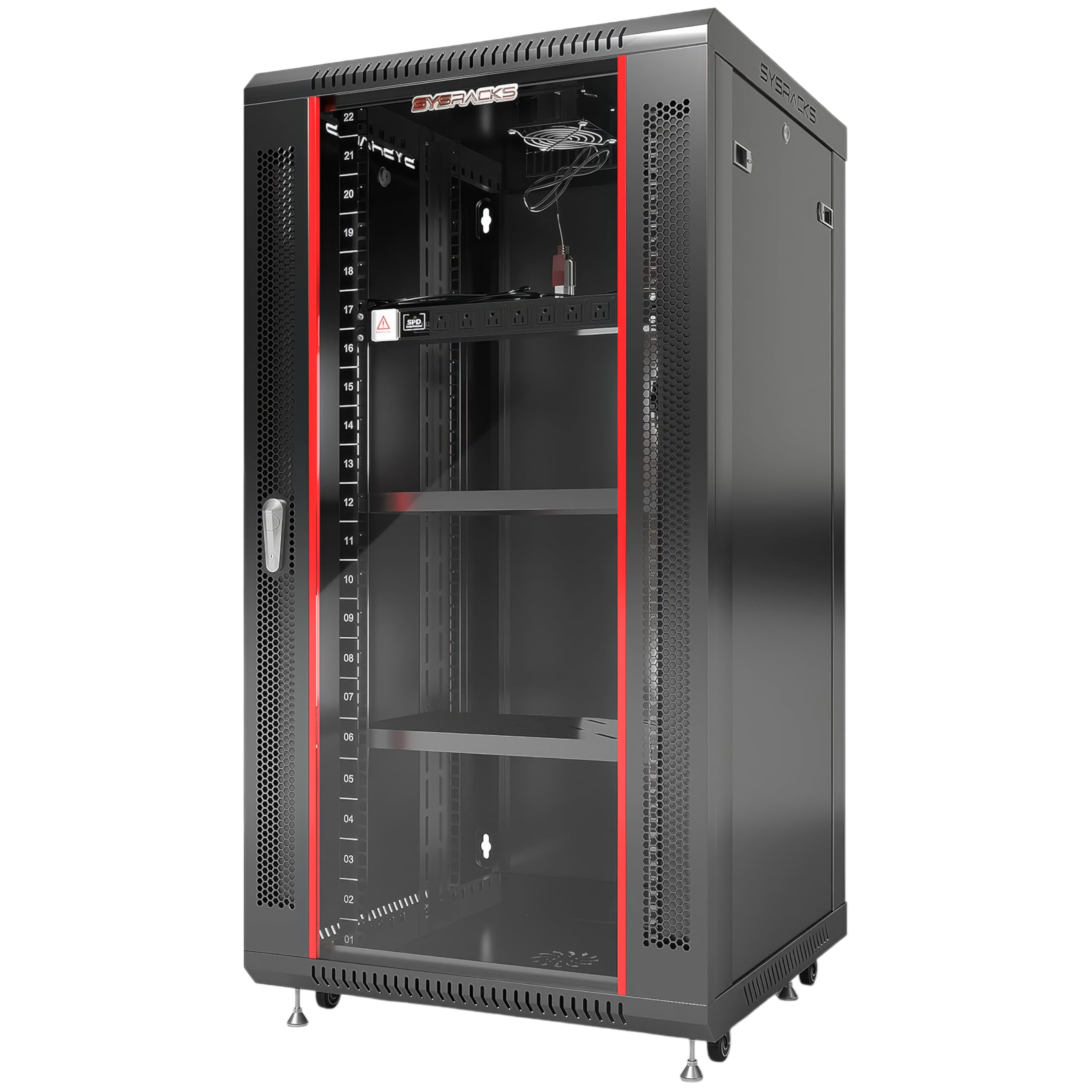
The Sysracks SRW 22.600 is a wall rack with an integrated top fan for active ventilation. Its locking tempered glass door has a perforation pattern that adds airflow through the front. Removable side panels give you service access.
It is 24 in deep overall with 20 in of usable mounting depth, the most among the models that state one. The Tecmojo 6U wall mount cabinet and the Tecmojo 18U wall mount cabinet offer 14.2 in.
It is 24 in wide and takes 19 in equipment to the EIA-310 standard. A PDU, brush cable entry panels and mounting hardware are included.
Weight is the catch. The cabinet weighs 85 lb, more than the other wall cabinets here. It supports up to 133 lb of installed equipment, and only when securely mounted to a solid wall.
The maker recommends only compact, lightweight servers in wall cabinets. Full-depth or heavy servers belong on a floor rack. The warranty runs 2 years.
It suits you if you are mounting a NAS, mini-server or UPS on a wall and want 20 in of usable depth plus an integrated top fan.
- Brand: Sysracks
- Rack units: 22U
- Overall depth: 24 in
- Usable mounting depth: 20 in
- Mounting type: Wall mount
- Weight: 85 lb
Frequently asked questions
The airflow math and the airflow path answer most of what comes up once a rack is chosen and the gear is going in.
Do I need a rack with fans, or is a vented cabinet enough?
It depends on the watts. A sealed cabinet sheds only about 30 W through its walls, 30 to 150 W needs filtered vents low and high, and 150 to 500 W needs forced convection with a fan plus filtered intake and exhaust. Add up your gear's draw and compare.
How do I work out how much airflow my rack needs?
Take the total draw in watts, convert it to BTU/hr, and divide by 1.08 times the temperature rise you are willing to accept in °F; the result is the CFM the load requires. A 300 W load, for example, comes out at roughly 63 CFM at a 15 °F rise.
Is a fan's CFM rating the airflow my gear actually gets?
No. Obstructions between the fan and the gear cut the delivered figure well below the free-air number, so pick a fan rated above your calculated need rather than exactly at it.
Where should the fans go, top or bottom?
Exhaust at the top works with rising hot air, with an intake low at the front feeding cool air in. Keep the two ends apart: an intake mounted high, right beside the exhaust, just stirs the same warm air in a loop. One clear direction beats more fans, and a fan placed directly over the hottest device's exhaust does more than one in an empty corner.
My switch has side-to-side airflow. Will a front-to-rear cabinet cool it?
Only if the airflow is managed. Side-to-side devices need internal gaskets or ducting in a front-to-rear cabinet, or the air short-circuits. Check each device's airflow direction before choosing the cabinet.
Will a quiet acoustic cabinet stay quiet once my servers are working hard?
Not necessarily. A cabinet's quiet rating is usually measured with the fans idling, and when the controller senses rising heat it can push them to maximum, which gives back much of the noise benefit you paid for. Judge a cabinet by how it behaves at full load, not by the idle figure on the box.
How much hotter is it inside an enclosed cabinet than in the room?
Expect a rise of a few degrees, and more if the cabinet is pushed flush to a wall or its filters are clogged. ASHRAE's recommended intake range is about 64 to 81 °F, so a room at 75 °F leaves only about 6 °F of headroom before the intake limit is reached. A networked probe that logs readings is worth having where the rack sits in another room.